


Planes Live - Flight Tracker
4.0717.00 Reviews
App Specs
- Version
- 1.44.4
- Updated On
- License
- Free
- Downloads
- 5,000,000+
- Developer
- Mosaic Srl
- Categories
- Travel & Local
- Platform
- Android
Screenshots

 Analysis by AppCompare
I judge a flight tracker by whether it helps me answer practical questions without turning every glance at a map into a research project. Planes Live - Flight Tracker makes following aircraft approachable: its moving map offers an immediate sense of what is in the air, while flight and airport details give that curiosity a useful next step. I find it most compelling as a companion for checking a particular journey or exploring nearby air traffic, rather than as a substitute for every airline or airport update.
A quick map check with a practical purpose
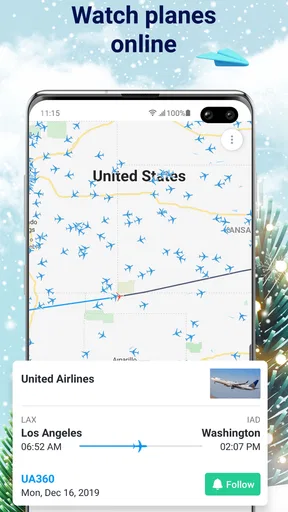
In everyday use, the strongest reason to open a tracker is usually a simple one: someone is flying, a pickup is coming up, or I have time to spare and want to see what is passing overhead. A map is well suited to those moments because it shows the wider picture before I need to search through a list. Tapping an aircraft and then checking its flight details turns that broad view into something more useful.
For a family pickup, I would use the app to follow the flight while keeping the airport’s own arrival information in mind for the final decision about when to leave. That distinction matters. A live aircraft position can clarify whether a plane is still en route, but it does not remove the value of checking the airport or airline for the most relevant arrival arrangements. I see the tracker as a helpful extra viewpoint, not the sole authority for a time-sensitive plan.
What the map is good at—and what it is not
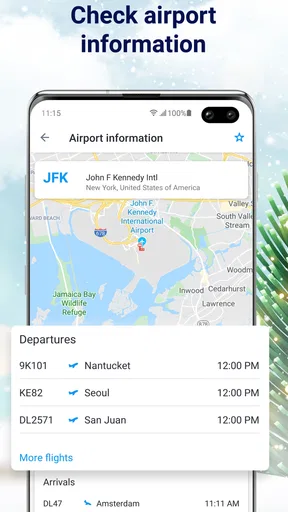
The map is the app’s natural centre of gravity. It makes aircraft movement easy to browse and gives aviation-curious users a more visual experience than a plain departure board. If I want to understand where a flight is in relation to its route, a map can communicate that at a glance in a way that a status line cannot. The airport information also broadens the experience beyond watching a single aircraft.
There is a trade-off in that visual approach: a busy area can put many icons on screen at once, and browsing can become less useful if I do not already have a flight or airport in mind. I get more from the app when I start with a specific question—such as whether a flight is still approaching—than when I expect the map alone to explain every detail of air traffic.
Who will get the most from it
I would recommend it to occasional travellers, people meeting arrivals, and anyone who enjoys watching aircraft and connecting a plane on the screen with a real journey. The live map makes it approachable even if you do not know aviation terminology, while the airport information gives practical context for people planning a trip. It is also useful for those who like to follow a friend’s or relative’s flight without repeatedly switching between a browser and other sources.
On the other hand, someone who only needs a boarding pass, check-in, gate instructions, or an airline-specific change may be better served by that airline’s own app. A flight tracker is useful for awareness, but it is not the same thing as managing a booking. I would also suggest skipping it if you rarely travel and have no interest in aircraft: its central appeal is following flights, so it may not earn a regular place on your home screen.
Worth Reading Before You Choose

Flipboard Shows What News Apps Must Do Beyond the Feed

Switching to Android Auto Means Rethinking Your Driving Routine

Google Calendar Makes a Crowded Week Easier to Manage

Ludo King Makes the Most of the Minutes Between Plans

Baby Panda World Brings Quick Play to Modern Phones, but Its Game Library Feels Busy

ESPN’s Live Game View Makes Following Close Games Easier
How it fits among travel tools
Compared with a conventional airport board, this app is more about aircraft and their movement than simply scanning a list of departures and arrivals. Compared with an airline app, it offers a broader tracking perspective rather than focusing on one carrier’s booking and passenger services. Those are meaningful differences, not reasons to discard either alternative. I would use the airline’s own tools for booking-specific tasks and turn to a tracker when the map or a wider view of flights is what I need.
A small workflow improvement is to save a flight I know I will check again, rather than searching for it from scratch every time. That is especially helpful when I am coordinating a pickup: I can check the saved journey, then verify the airport’s arrival information before setting off. For casual plane-spotting, I would instead zoom into a familiar area and treat the map as an exploration tool, while remembering that a displayed position is a tracking view rather than a promise about what I can see from the ground.
Getting Started with Planes Live
First things first, downloading the app is a breeze. Once installed, the interface greets you with a map filled with tiny airplane icons buzzing around. It’s a bit like playing a game of Where's Waldo, but with planes. The app is available on both Android and iOS, so no one's left out. I found the setup pretty straightforward—no complex registration processes, just a quick tutorial to get you acquainted with the basics.
Features That Take Off
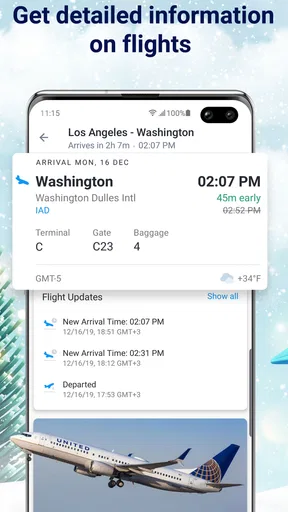
Planes Live - Flight Tracker is packed with features that aviation enthusiasts will love. You can track flights in real-time, get detailed flight information like departure and arrival times, and even receive notifications about changes or delays. I personally love the real-time map feature; it’s fascinating to see planes traversing continents in real-time. You can zoom in and out, tap on a plane to get more information, and even see a 3D simulation of the flight's path.
Another feature that stands out is the airport information section. It provides a rundown of major airports, including their current weather conditions, which can be incredibly handy if you're planning a trip. And for those of us who have a loved one flying, the app lets you save flights to track them more easily. No more frantically refreshing your browser to see if your friend's plane has landed!
User Experience and Design
The design is sleek and modern, with a minimalist look that doesn't overwhelm you with too much information at once. The app runs smoothly, with minimal lag, even when tracking multiple flights. I did notice that the initial load can take a couple of seconds longer if you’re not connected to Wi-Fi, but it’s nothing too bothersome. The app’s color scheme is easy on the eyes, which is great for those late-night flight-tracking sessions.
Planes Live is a free travel and local app from Mosaic Srl, with optional in-app purchases ranging from $0.99 to $99.99 per item. It has a 4.0 average from around 71,000 ratings, and has been installed over 5 million times. Its age rating is Everyone, and version 1.44.4 lists Android 7.0 as the minimum requirement. Those figures suggest a well-established audience, though popularity alone cannot tell me whether every detail will suit my needs.
Why You Might Want It
If you travel frequently, Planes Live - Flight Tracker could become your new best friend. It offers a sense of control and awareness over flights that’s quite reassuring. The app’s notifications are particularly useful, keeping you updated on any changes to your flight schedule. Even if you're not a frequent flier, the app is a fun tool for anyone curious about aviation or looking to keep tabs on incoming and outgoing flights from their local airport.
For a realistic travel day, I would check the flight before leaving home, save it if I expect to revisit it, and then use the map to see whether it is still on its way while I am travelling to the airport. If a notification arrives, I would treat it as a prompt to verify the latest status rather than as a reason to change plans automatically. That habit makes the app more useful without giving a tracking estimate more authority than it deserves.
Room for Improvement
While the app is pretty solid, it’s not without a few hiccups. Some users have reported minor accuracy issues with flight times and locations, although I didn’t encounter any significant discrepancies during my testing. It would also be nice to have some more customization options for notifications, especially if you're tracking multiple flights at once. But these are minor grievances in an otherwise excellent app.
That notification trade-off becomes more noticeable when several people are travelling at once. An alert can save repeated checking, but too many updates can create noise, especially if the app does not let me tailor them as closely as I would like. I would keep saved flights to the journeys I genuinely need to monitor and use the map for casual browsing separately. This keeps the practical task distinct from the entertainment of watching aircraft move.
Coverage and timing also deserve a sensible approach. A tracker’s value depends on the information reaching the screen, so if a displayed position or time seems surprising, I would compare it with the carrier or airport before making a costly or inconvenient decision. That is not a reason to avoid the app; it is simply how I would use any flight-tracking tool responsibly, particularly when meeting someone or arranging onward transport.
Lastly, the app does have a premium version, which offers additional features like no ads and an expanded flight history. For the avid traveler, it might be worth the upgrade, but the free version is quite robust on its own.
The Final Verdict
So, is Planes Live - Flight Tracker worth downloading? I’d say yes, especially if you have an interest in aviation or tend to travel frequently. It’s a well-designed app that offers a wealth of information at your fingertips. Whether you're tracking a flight for a loved one or just curious about the planes overhead, this app is both practical and intriguing. Give it a try, and you might find yourself checking in more often than you expected!
My recommendation is specific: choose it if you want a visual way to follow aircraft, keep tabs on a saved journey, or add context to an airport visit. Keep the airline’s app or airport information close for booking changes and decisions that depend on the latest operational details. With that division of jobs, the tracker feels useful rather than redundant. It is free to try, and its best quality is making flight movement easy to explore; its main caution is not to confuse a helpful overview with a guarantee.
Pros
- Real-time flight updates enhance travel planning.
- User-friendly interface for seamless navigation.
- Comprehensive airport information available.
- Customizable notifications for flight changes.
- Supports multiple languages for global users.
Cons
- Some features locked behind a paywall.
- Occasional inaccuracies in flight data.
- Requires internet connection for updates.
- Ads can be intrusive in free version.
- Battery consumption can be high with frequent use.
FAQs for Planes Live - Flight Tracker
What features does Planes Live - Flight Tracker offer?
Planes Live - Flight Tracker provides real-time information about flights, including departure and arrival times, delays, and gate information. Users can explore detailed maps showing flight paths and airports worldwide. The app also offers notifications for flight status updates, helping users stay informed about changes to their travel plans.
Is Planes Live - Flight Tracker available on both Android and iOS?
Yes, Planes Live - Flight Tracker is available for download on both Android and iOS platforms. Users can easily find the app on the Google Play Store and the Apple App Store. It is designed to offer a seamless experience on both operating systems, providing the same features and functionality.
Does the app offer any customization options?
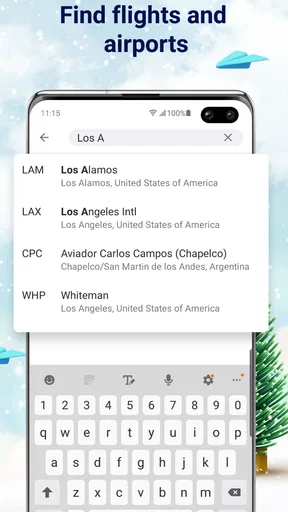
Planes Live - Flight Tracker allows users to customize their experience by setting up personalized notifications for specific flights. Users can also filter and sort flights by airline, airport, or flight number. The app’s interface is intuitive, allowing users to tailor the display settings according to their preferences, enhancing usability.
Are there any subscription fees associated with the app?
Planes Live - Flight Tracker offers a free version with basic features. However, users can opt for a premium subscription to unlock additional features such as ad-free usage, enhanced flight information, and advanced tracking options. Subscription fees vary and can be billed monthly or annually, depending on user preference.
How accurate is the flight tracking information?
The app sources data from reliable aviation databases and uses advanced algorithms to provide accurate and up-to-date flight information. While the app strives for precision, slight discrepancies may occur due to unforeseen circumstances such as sudden flight changes or technical issues. Overall, it maintains a high standard of accuracy.


